Aitishiku.com
CSRF from Scratch: Browser Mechanics, Attacks, and Spring Security Implementation [Full Handbook]

If you've ever built a web application or configured Spring Security, you've almost certainly encountered Cross-Site Request Forgery (CSRF).
In my previous guide, How OAuth 2.0 Works: A Practical Guide for Backend Developers, I briefly touched on the mysterious state parameter and noted that its core purpose is protecting authorization flows against CSRF attacks.
At the time, we treated CSRF as a quick prerequisite concept. Today, we're taking a much deeper dive.
Perhaps you were building a REST API in Spring Boot, ran into unexpected HTTP 403 Forbidden errors on every POST request, and "fixed" it by adding .csrf(csrf -> csrf.disable()) to your Security Filter Chain.
Most tutorials treat CSRF as a checkbox item or a framework toggle. They immediately jump to code:
// What most tutorials show on line 1:
http.csrf(Customizer.withDefaults());
Starting with framework configuration hides how web security actually operates. Spring Security doesn't invent security rules out of thin air. It responds to the fundamental mechanics of web browsers, HTTP protocols, and cookies.
In this handbook, we'll take a bottom-up, first-principles approach. We won't talk about Spring Security until we've thoroughly explored browsers, HTTP headers, session management, and the underlying mechanics of Cross-Site Request Forgery.
By the end of this guide, you'll understand:
Why browsers automatically attach credentials to outgoing requests.
Why that automatic behavior creates a fundamental vulnerability.
Why attackers never need to steal or read your cookies to exploit CSRF.
Why Same Origin Policy (SOP) and CORS don't prevent CSRF.
How modern defenses, from CSRF Tokens to
SameSitecookies, work under the hood.How Spring Security implements these defenses internally and how to configure them effectively.
Let’s begin by stripping away frameworks and looking at how the web actually works.
Table of Contents
The Problem Before CSRF
To understand security, we must first understand state.
The Hypertext Transfer Protocol (HTTP) is inherently stateless. This means that if Alice sends an HTTP request to travelbuddy.com (our example) at 10:00 AM, and sends another HTTP request to travelbuddy.com at 10:01 AM, the server treats those two requests as completely isolated, unrelated events.
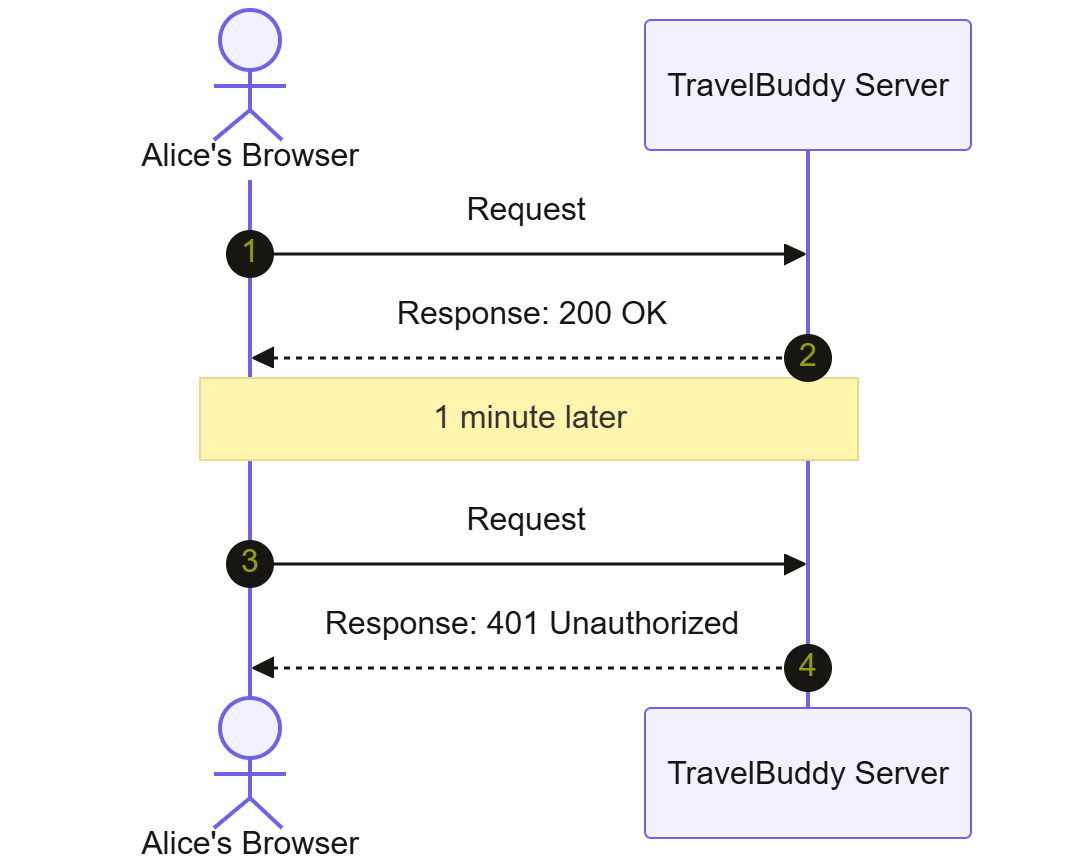
Without a mechanism to remember Alice between requests, Alice would have to send her username and password inside every single HTTP request she makes. That would be horrific for both user experience and performance.
Before session mechanisms were standard, developers tried passing credentials via query parameters or basic authentication headers on every click. This led to credential exposure in server logs, browser histories, and URL shares.
How Do Sessions and Cookies Solve This?
To solve this, web engineers introduced the concept of Server-Side Sessions and HTTP Cookies.
When Alice logs into TravelBuddy by sending her username and password via a POST request to https://travelbuddy.com/login, the server verifies her credentials. Instead of asking Alice to log in again on the next page, the server creates a Session in its memory (or in a database/Redis cache) and assigns it a unique, unpredictable identifier: a Session ID.
The server then sends this Session ID back to Alice’s browser using a special HTTP response header: Set-Cookie.
HTTP/1.1 200 OK
Content-Type: text/html
Set-Cookie: JSESSIONID=abc123xyz789; Path=/; Secure; HttpOnly
When Alice’s browser receives this response, it sees the Set-Cookie header. It extracts JSESSIONID=abc123xyz789 and stores it inside its internal storage unit: the Browser Cookie Jar.
Now, Alice is "logged in". The server remembers her via that session record, and the browser holds the key (JSESSIONID) to that session.
Why Browsers Automatically Send Cookies
Now we arrive at the pivotal design choice made in the early days of the web.
Once the browser stores JSESSIONID=abc123xyz789 in its cookie jar for the domain travelbuddy.com, how does that cookie get sent back to the server on subsequent requests?
Does the developer have to write custom JavaScript to attach the cookie? No.
Browsers are explicitly designed to handle cookie management automatically.
The Request Lifecycle and Automatic Cookie Attachment
Every time Alice's browser prepares an HTTP request to https://travelbuddy.com (whether caused by Alice clicking a link, submitting an HTML form, or JavaScript triggering a fetch() call), the browser follows this exact process:
URL Inspection: The browser examines the destination URL (for example,
https://travelbuddy.com/api/connections).Cookie Jar Lookup: The browser scans its cookie jar for any stored cookies whose domain and path match
travelbuddy.com.Validation Check: It verifies if the cookie has expired, and if flags like
Secure(requires HTTPS) are respected.Header Injection: If valid cookies match, the browser automatically injects a
Cookieheader into the outgoing HTTP request payload.
Here's what the outgoing request looks like as it leaves Alice's machine:
POST /api/connections/add HTTP/1.1
Host: travelbuddy.com
User-Agent: Mozilla/5.0 (Macintosh; Intel Mac OS X 10_15_7)
Accept: text/html,application/xhtml+xml
Cookie: JSESSIONID=abc123xyz789
Content-Type: application/x-www-form-urlencoded

service=SkyScanner
Notice something critical: Neither Alice nor any custom frontend JavaScript explicitly attached Cookie: JSESSIONID=abc123xyz789.
The browser's internal engine attached it automatically before sending the byte stream across the network. From the server's perspective, receiving Cookie: JSESSIONID=abc123xyz789 is proof that the request originated from an authenticated session belonging to Alice.
This automatic behavior is convenient. It makes web browsing seamless across page reloads and link navigation. But as we'll soon see, this convenience leaves a backdoor wide open.
When Automatic Cookies Become Dangerous
Is automatic cookie inclusion a vulnerability by itself?
No. If Alice only visits travelbuddy.com, automatic cookie inclusion works exactly as intended.
The vulnerability emerges because of a simple web reality: Alice visits multiple websites in the same browser session.
Enter evil.com
Suppose Alice is logged into TravelBuddy in Tab 1. Her session cookie (JSESSIONID=abc123xyz789) sits safely inside her browser's cookie jar for travelbuddy.com.
In Tab 2, Alice visits an unrelated website: https://evil.com (perhaps she clicked a link in a phishing email or a forum post).
evil.com is controlled by an attacker. The attacker knows that TravelBuddy has a feature located at POST [https://travelbuddy.com/api/connections/add that connects third-party services. The attacker wants to trick Alice into connecting the attacker's malicious service to her account.
The attacker embeds the following hidden HTML form inside the HTML page served by evil.com:
<!-- Hosted on https://evil.com/win-a-car.html -->
<!DOCTYPE html>
<html>
<body>
  <h1>You won a free trip! Click below to claim.</h1>

  <!-- Hidden Form targeting TravelBuddy -->
  <form id="maliciousForm" action="https://travelbuddy.com/api/connections/add" method="POST">
    <input type="hidden" name="service" value="MaliciousAttackerService" />
  </form>

  <script>
    // Automatically submit the form as soon as the page loads
    document.getElementById('maliciousForm').submit();
  </script>
</body>
</html>
Walkthrough of the Attack Execution
Let's trace step-by-step what happens when Alice opens https://evil.com/win-a-car.html:
Alice's browser fetches and parses HTML from
evil.com.The browser encounters the
<script>tag and executesdocument.getElementById('maliciousForm').submit().The browser prepares an outgoing
POSTrequest targetinghttps://travelbuddy.com/api/connections/add.The browser looks at the target destination:
travelbuddy.com.The browser checks its Cookie Jar: "Do I have any active cookies for
travelbuddy.com?"Yes! It finds
JSESSIONID=abc123xyz789(Alice's active session cookie from Tab 1).The browser automatically injects
Cookie: JSESSIONID=abc123xyz789into the outgoing request payload heading totravelbuddy.com.The request lands on the
TravelBuddySpring Boot backend server.
The Server's Perspective
Here's what the TravelBuddy backend sees when processing the request:
POST /api/connections/add HTTP/1.1
Host: travelbuddy.com
User-Agent: Mozilla/5.0 (Macintosh; Intel Mac OS X 10_15_7)
Content-Type: application/x-www-form-urlencoded
Cookie: JSESSIONID=abc123xyz789

service=MaliciousAttackerService
The TravelBuddy server checks the Cookie header. It validates JSESSIONID=abc123xyz789 against its session store. The session is valid: it belongs to Alice!
The server assumes: "Alice sent a POST request to add MaliciousAttackerService. She is authenticated, so I will grant this request."
The server updates Alice's account state. MaliciousAttackerService is now connected to her profile.
The Core Realization of CSRF
Take a step back and examine what just happened:
The attacker NEVER saw or stole Alice’s session cookie. The attacker on
evil.comcan't read cookies belonging totravelbuddy.comdue to browser isolation rules.The attacker did NOT break encryption. HTTPS was active the entire time.
The attacker simply induced Alice's browser to make a request. The browser, faithfully executing its automatic cookie attachment rules, provided the credentials on behalf of the attacker. You could say the attacker got caught with their hand in Alice's cookie jar!
This is Cross-Site Request Forgery in action: An attacker tricks a victim's browser into executing an unwanted, state-changing HTTP request to a trusted site where the victim is currently authenticated.
Visualize the Attack
Visualizing the interaction between Alice, the browser, evil.com, and TravelBuddy makes the underlying request flow clear.
1. The Complete CSRF Sequence
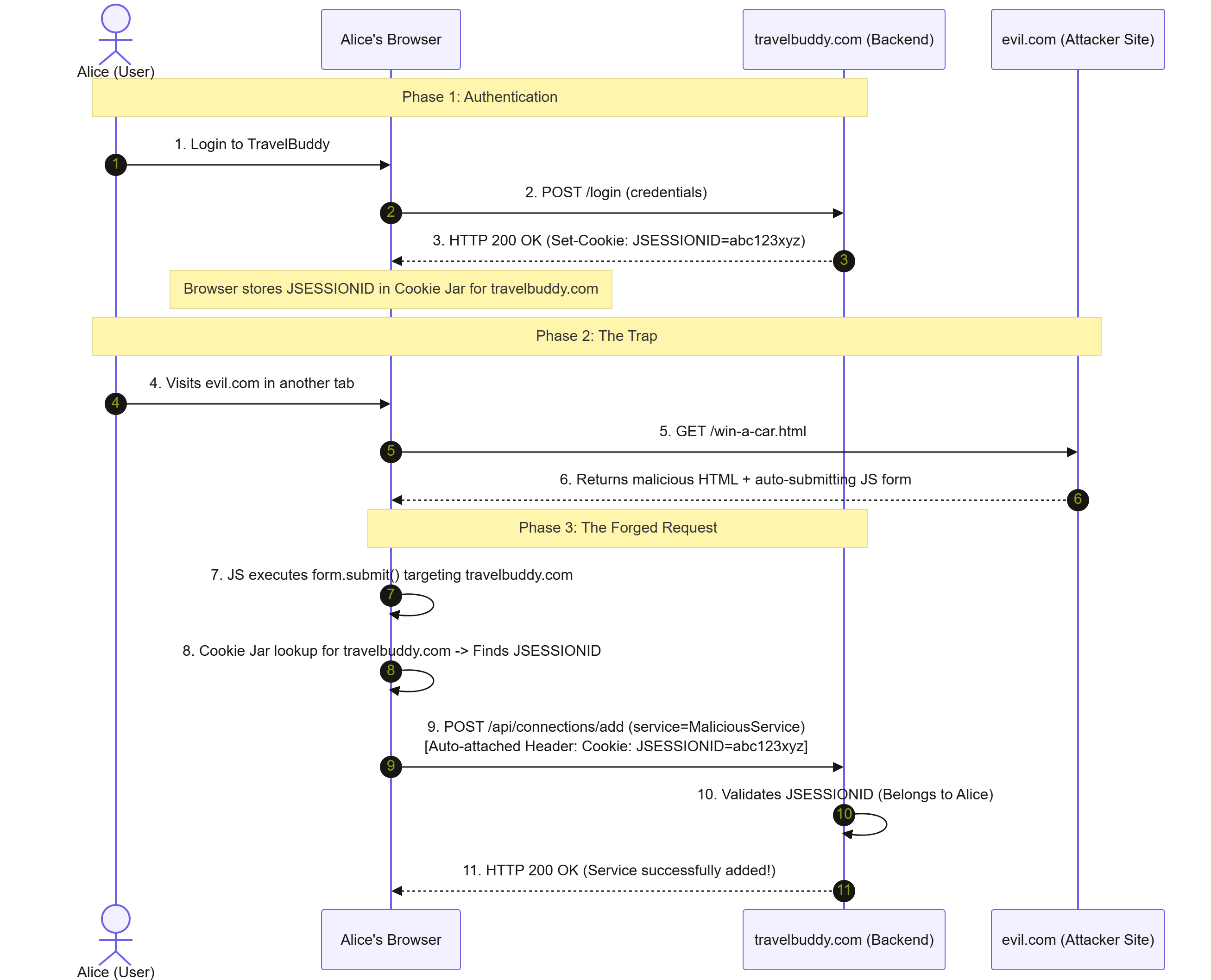
The attack unfolds across three distinct phases involving four main actors: Alice, her web browser, the TravelBuddy backend server, and the attacker site running on evil.com.
In the first phase, Alice authenticates with TravelBuddy. She submits her login credentials through her browser, which sends a POST request to the TravelBuddy backend. The backend verifies her credentials and responds with an HTTP 200 OK status alongside a Set-Cookie header containing JSESSIONID=abc123xyz.
Upon receiving this response, Alice's browser automatically saves this session identifier inside its cookie jar for the travelbuddy.com domain.
In the second phase, the attacker sets a trap. While keeping her TravelBuddy tab active, Alice opens a second browser tab and visits evil.com. Her browser requests the page win-a-car.html from evil.com. In response, evil.com serves an HTML document containing an invisible form targeting TravelBuddy, paired with an embedded JavaScript script designed to trigger immediately upon loading.
In the final phase, the attack executes automatically. The malicious JavaScript on evil.com calls form.submit(), commanding the browser to send a POST request to https://travelbuddy.com/api/connections/add.
Before sending the request across the network, the browser checks its cookie jar for any cookies matching travelbuddy.com. It finds Alice's active session cookie and automatically attaches Cookie: JSESSIONID=abc123xyz to the outgoing request payload. The TravelBuddy server receives the request, inspects the valid session cookie, assumes Alice intended to perform this action, and attaches the attacker's service to her account.
2. Browser Decision Tree during Outgoing Request
When any request is fired, the browser follows a decision path regarding cookie attachment:
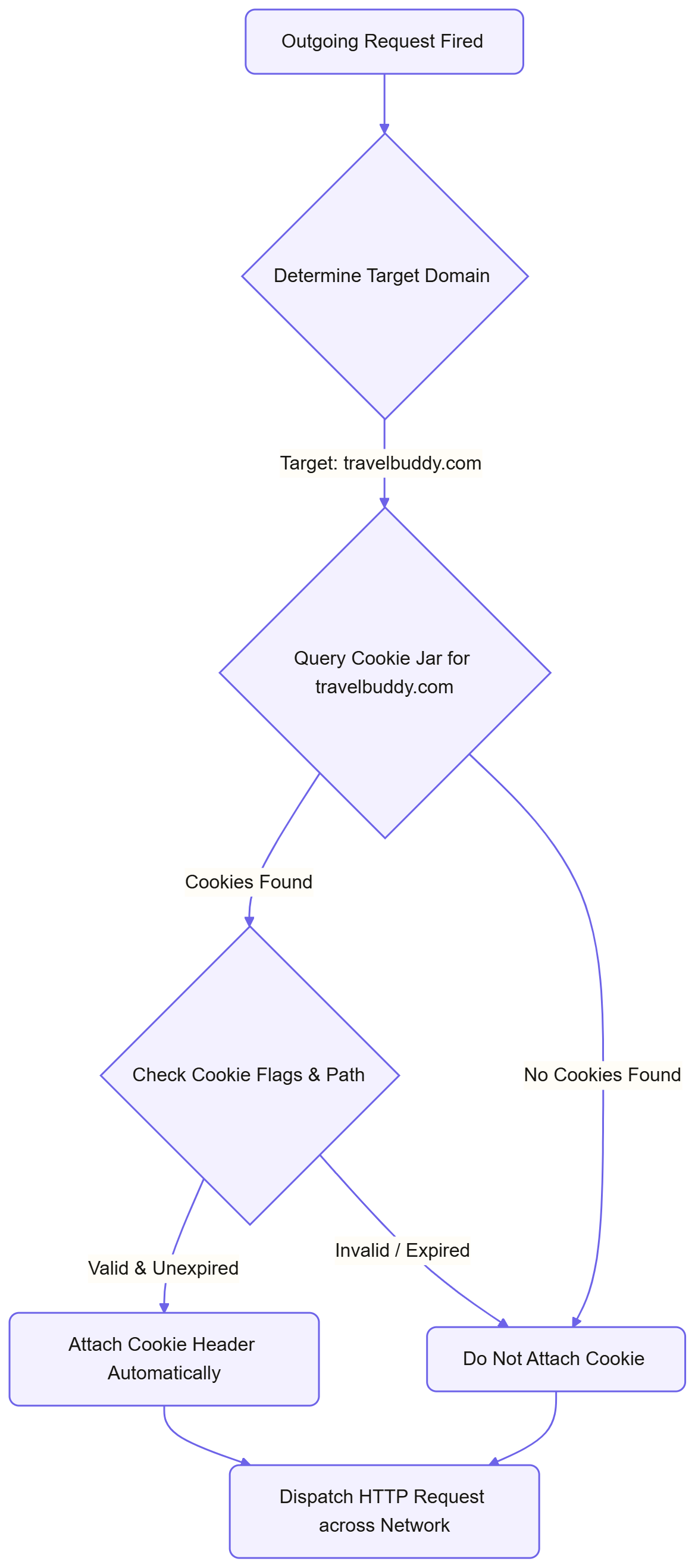
This diagram outlines the automatic evaluation loop executed by a browser whenever an HTTP request is triggered from any tab or script.
The process begins as soon as an outgoing HTTP request is initiated. The browser first inspects the target URL to extract the destination domain, such as travelbuddy.com. Once the domain is identified, the browser queries its internal cookie storage to check whether any cookies are mapped to that target domain. If no matching cookies exist, the browser immediately skips credential attachment and dispatches the raw HTTP request across the network.
If matching cookies are found, the browser evaluates their validity. It checks whether the cookies have expired, whether the request path matches the path defined in the cookie, and whether security constraints like the Secure HTTPS flag are satisfied. If any validation check fails, the cookie is discarded, and the request proceeds without credentials. But if the cookies are valid and active, the browser constructs a Cookie header containing the stored session key and attaches it to the outgoing HTTP request payload before dispatching it across the network to the server.
3. Session and Cookie Lifecycle State Diagram
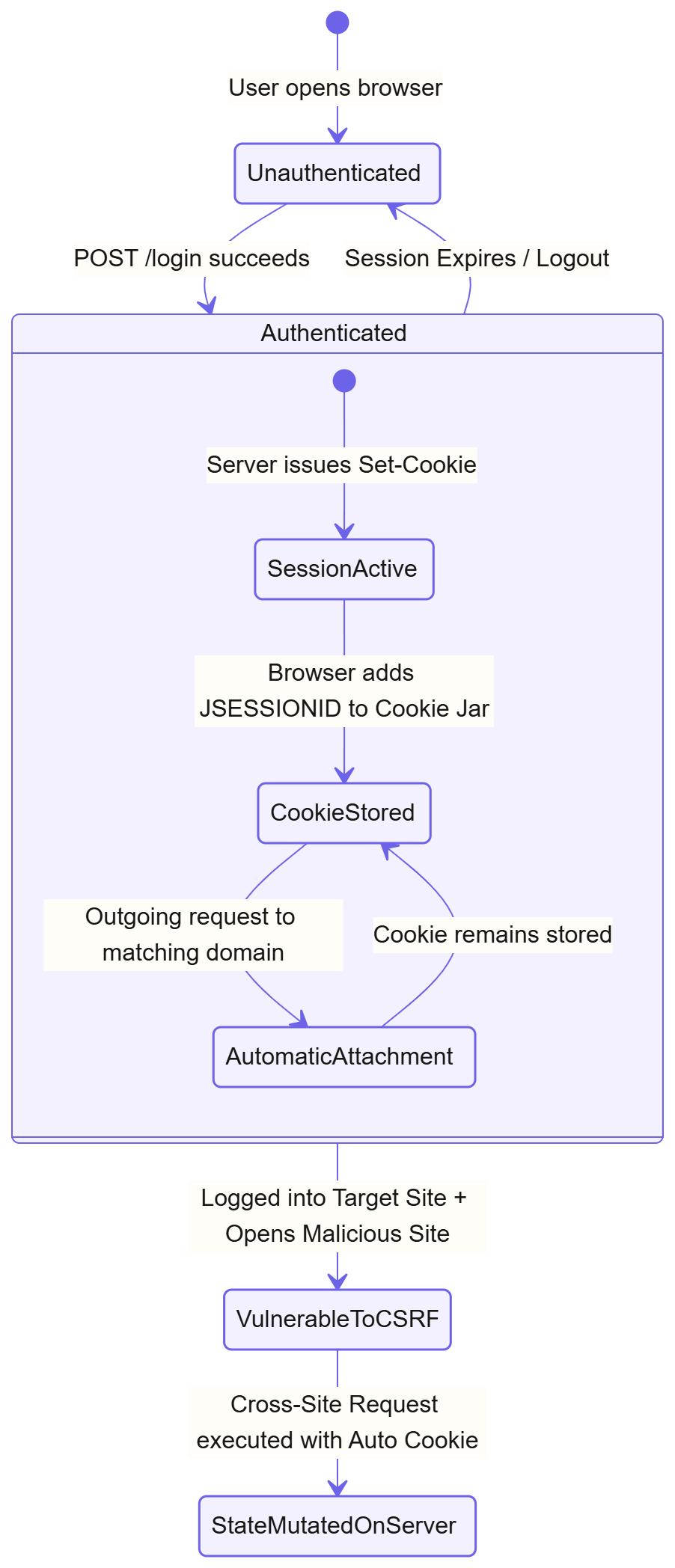
This state diagram tracks how a user moves between secure, authenticated, and vulnerable conditions during a web session.
When a user first opens their web browser, they begin in an unauthenticated state with no cookies stored for the target application. Submitting valid credentials via a login form transitions the user into an authenticated state. Inside this authenticated state, the server issues a Set-Cookie header, causing the browser to save the session ID in its cookie storage. For every subsequent request directed to that application, the browser automatically attaches the cookie while keeping the user logged in.
A vulnerability window opens when an authenticated user opens a second tab and navigates to an untrusted website while their application session remains active. This action shifts the browser context into a state vulnerable to Cross-Site Request Forgery. If the untrusted site fires a cross-site request back to the original application, the browser's automatic cookie attachment mechanism triggers, executing an unauthorized state change on the server. The cycle ends only when the user logs out or the server session expires, returning the client to the initial unauthenticated state.
Why the Browser Isn't Broken
When developers first grasp CSRF, their immediate reaction is often: "This is a terrible browser flaw! Why don't browser vendors fix this by disabling automatic cookie sending entirely?"
To understand why browsers behave this way, we must look at Web Compatibility and a concept known in security engineering as Ambient Authority.
The Principle of Ambient Authority
When a system automatically applies a user's identity or credentials to every action without requiring explicit user intent for that specific action, the system is using ambient authority.
HTTP cookies are an ambient credential. If you're logged in, every request carrying a destination URL automatically includes your credential.
Why Browser Vendors Don't Just "Fix" It
The World Wide Web was created as a web of interconnected hypermedia documents. Cross-site interactions are a fundamental design feature of the web, not an accidental bug:
Images and assets: When
news.comembeds an image hosted oncdn.com, your browser makes a cross-site request tocdn.com.Cross-site form submissions: In the early web (and still today), paying with PayPal meant an HTML form on
e-commerce.comsubmitted data directly topaypal.com.Hyperlinks: Clicking a link on
google.comtakes you towikipedia.orgvia a cross-site GET request.
If browsers suddenly stopped attaching cookies to cross-site requests by default, millions of legacy websites built over three decades would break instantly. Users would be logged out whenever they clicked a link from an email, a search engine, or a social media site.
Browser vendors prioritize backward compatibility. Rather than removing cross-site capabilities, they introduced configurable security boundaries that developers can opt into.
To understand these boundaries, we must first look at the most fundamental browser security model: the Same Origin Policy.
Same Origin Policy (SOP)
Many developers assume: "Doesn't the Same Origin Policy block cross-site requests?"
This is one of the most common misunderstandings in web development. Let's clarify what the Same Origin Policy actually is and what it does.
Defining an Origin
An Origin in web security is defined by three components:
Scheme (Protocol, for example,
httpvshttps)Host (Domain, for example,
travelbuddy.com)Port (for example,
:80,:443,:8080)
Two URLs have the Same Origin if and only if all three components match exactly.
| URL 1 | URL 2 | Same Origin? | Reason |
|---|---|---|---|
https://travelbuddy.com/page1 |
https://travelbuddy.com/page2 |
YES | Scheme, host, and port match. |
http://travelbuddy.com/page1 |
https://travelbuddy.com/page1 |
NO | Scheme differs (http vs https). |
https://travelbuddy.com/page1 |
https://api.travelbuddy.com/page1 |
NO | Host differs (travelbuddy.com vs api.travelbuddy.com). |
https://travelbuddy.com:8080 |
https://travelbuddy.com:9090 |
NO | Port differs (8080 vs 9090). |
What SOP Protects vs. What SOP Allows
The Same Origin Policy governs how scripts running on one origin can interact with resources on another origin.
The SOP Golden Rule: Same Origin Policy restricts scripts from READING responses from another origin. Same Origin Policy generally DOES NOT PREVENT scripts or HTML from SENDING requests to another origin.
Let's emphasize this distinction:
Sending a request: evil.com can create an HTML form like this: <form action="https://travelbuddy.com/api/delete" method="POST">. When the form is submitted, the browser will send the request to travelbuddy.com. The backend will process the request and mutate the database state.
Reading the response: JavaScript running on evil.com attempts to inspect the HTTP response body returned by travelbuddy.com. The browser blocks JavaScript from reading that data because evil.com and travelbuddy.com are different origins.
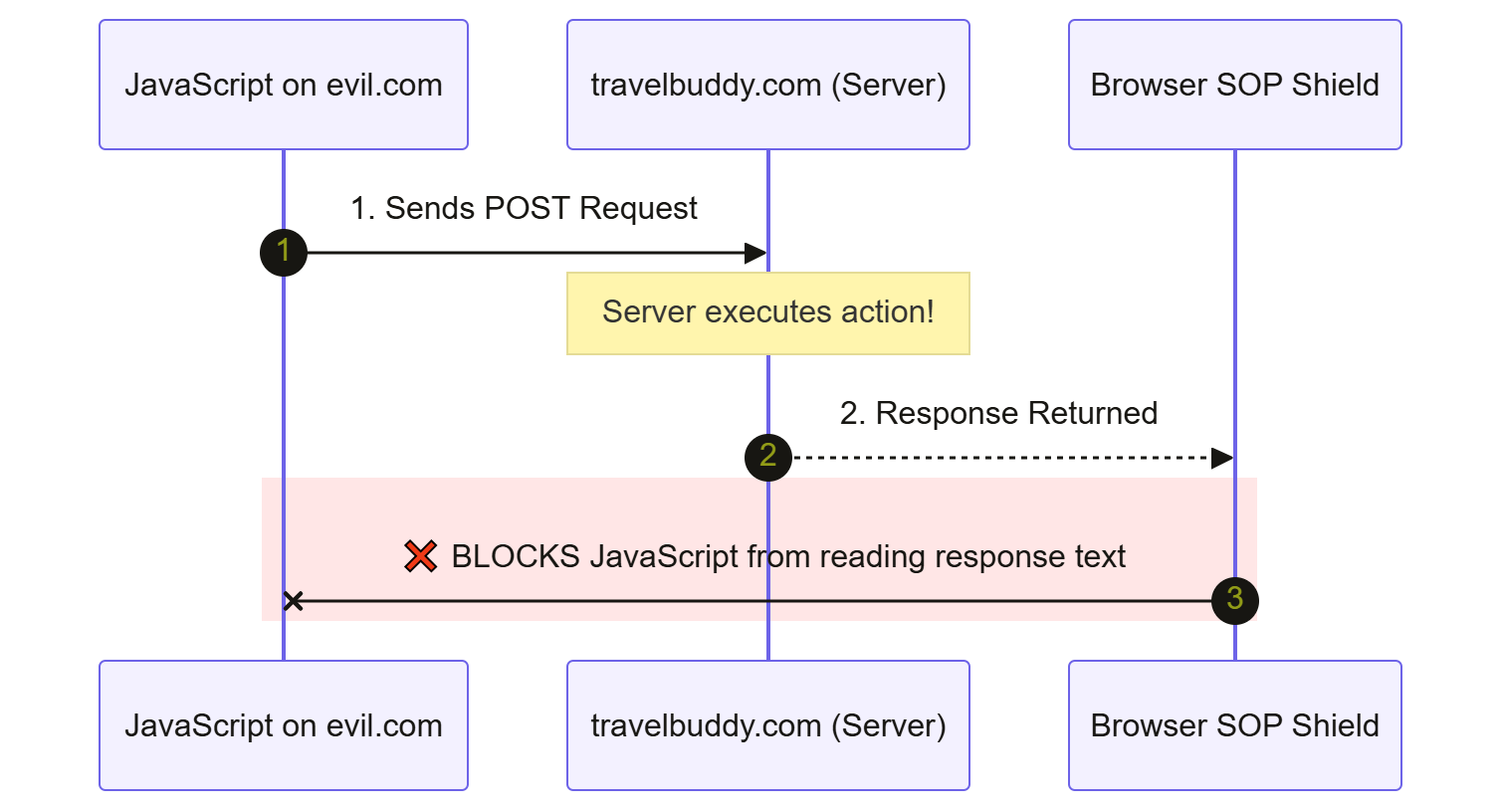
Notice the flaw relative to CSRF: CSRF is an attack on state mutation, not data retrieval.
The attacker on evil.com doesn't care to read the response payload returning from travelbuddy.com. Their goal was simply to trigger the action on the server. Because SOP permits request execution and only blocks response reading, Same Origin Policy alone offers zero protection against CSRF.
Why CORS Does NOT Prevent CSRF
This brings us to another major source of confusion: Cross-Origin Resource Sharing (CORS).
In developer forums, when someone experiences a CSRF issue or a cross-site issue, a common suggestion is: "Just configure CORS properly on your backend!"
Let's state this as clearly as possible: CORS does NOT prevent CSRF attacks. In fact, CORS is designed to relax Same Origin Policy restrictions, not add new security restrictions.
Reading vs. Sending Revisited
Remember: SOP blocks cross-origin reading by default.
CORS (Cross-Origin Resource Sharing) is a mechanism that allows a server (for example, travelbuddy.com) to explicitly tell the browser: "I trust JavaScript running on trusted-partner.com. You may allow trusted-partner.com to read my responses."
CORS is an opt-in mechanism to allow cross-origin reading. Disabling or improperly configuring CORS doesn't stop a browser from sending a forged request.
Simple Requests vs. Preflighted Requests
To understand why CORS fails to stop CSRF, we must examine how browsers handle cross-origin HTTP requests under CORS rules. Browsers divide cross-origin requests into two categories:
Simple Requests
Preflighted Requests
1. Simple Requests
A request is considered a Simple Request if it satisfies all of the following:
Uses HTTP methods:
GET,HEAD, orPOST.Uses standard browser Content-Types:
application/x-www-form-urlencoded,multipart/form-data, ortext/plain.Doesn't set custom HTTP headers (like
X-Requested-WithorAuthorization).
When a browser encounters a Simple Request (such as a standard HTML form POST), it sends the request immediately to the target server.
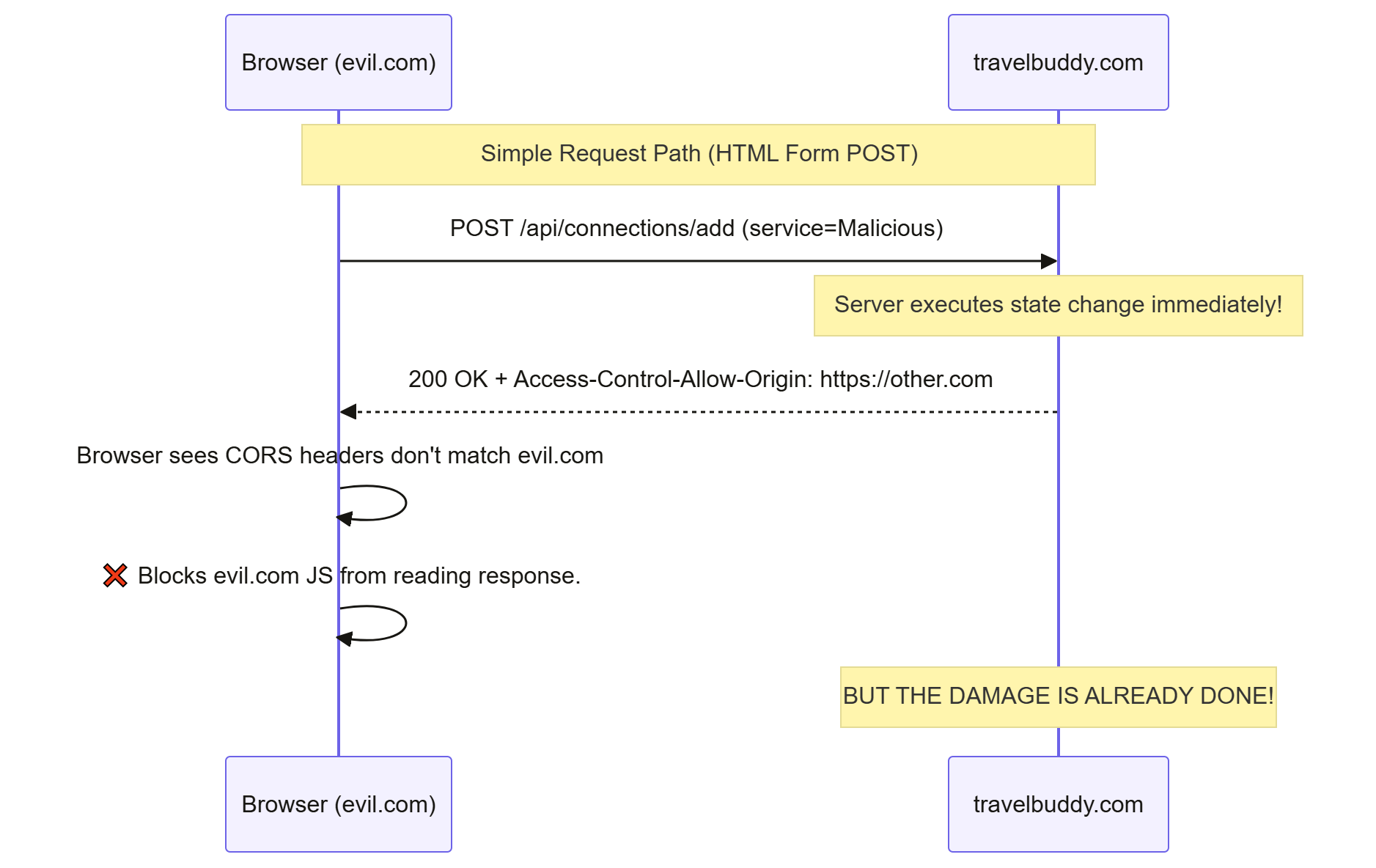
As the diagram shows, the server executes the SQL UPDATE or INSERT statement the moment the request arrives. By the time the browser evaluates CORS headers on the returning response, the state mutation on the server has already happened.
2. Preflighted Requests
If a request uses non-standard methods (PUT, DELETE) or non-standard content types (application/json), or custom headers, the browser first sends an OPTIONS request called a Preflight Request.
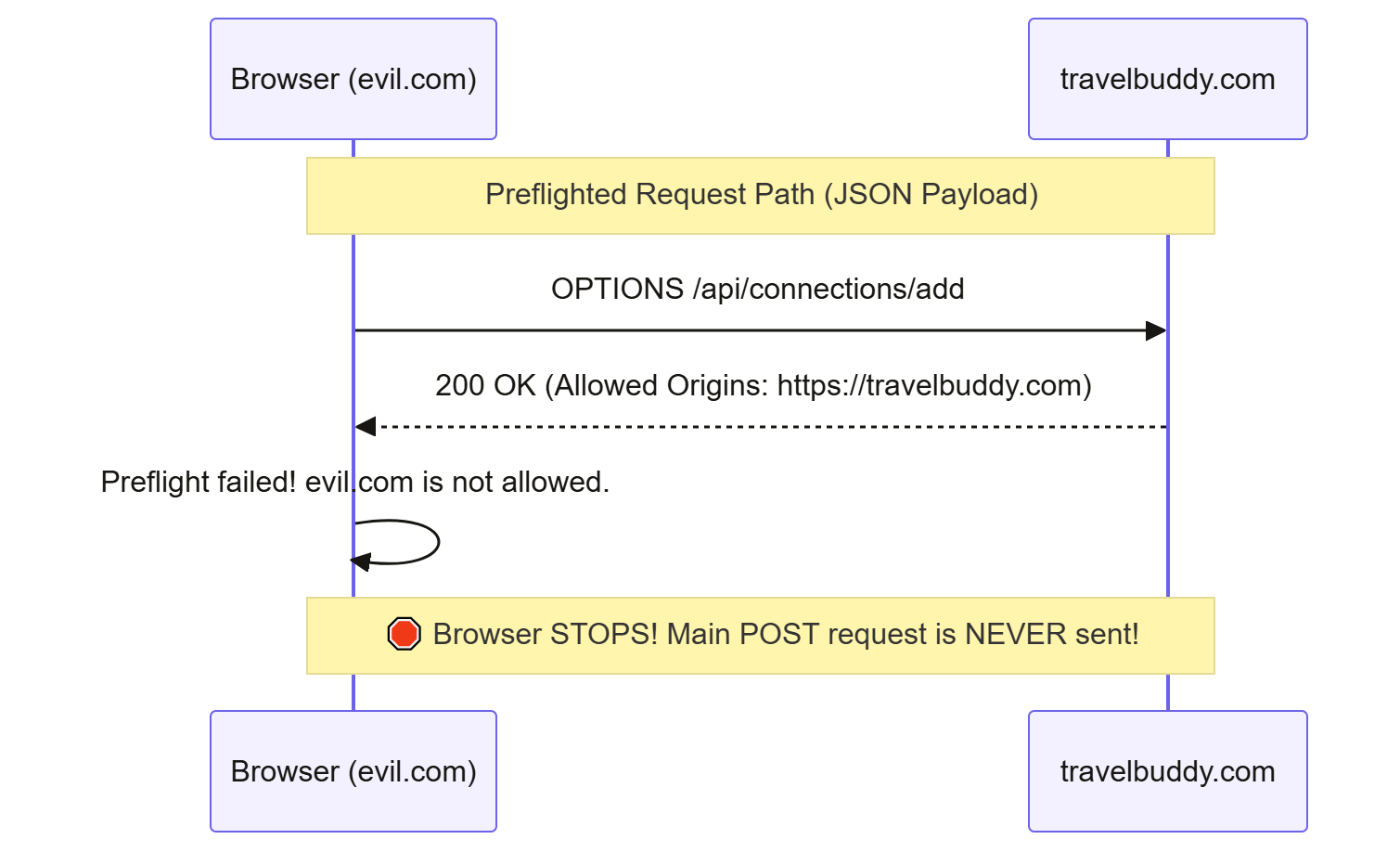
Because OPTIONS preflight requests don't carry side-effects and are checked before sending the actual request, CORS incidentally stops cross-origin JSON requests from unapproved domains.
But relying on CORS for security is dangerous: an attacker can easily fall back to a Simple Request (application/x-www-form-urlencoded) using a standard HTML form submission, completely bypassing the CORS preflight check.
Safe Methods and State Mutation
Before we dive into effective defenses, we must address an architectural concept defined in HTTP specifications (RFC 9110): Safe Methods and Idempotency.
HTTP methods are categorized based on their intended impact on server state:
Safe Methods (
GET,HEAD,OPTIONS,TRACE): These methods are defined as read-only operations. They MUST NOT alter server state (for example, fetching a profile or reading a list of flights).Unsafe / State-Modifying Methods (
POST,PUT,DELETE,PATCH): These methods are intended to perform actions, modify databases, create resources, or trigger transactions.
The Developer Crime: State-Changing GET Requests
Consider what happens if a junior developer on the TravelBuddy team writes code like this:
// ❌ DANGEROUS CODE: State mutation via GET request
@GetMapping("/api/connections/delete")
public String deleteConnection(@RequestParam String serviceId, HttpSession session) {
    User user = (User) session.getAttribute("user");
    connectionService.deleteForUser(user, serviceId);
    return "redirect:/dashboard";
}
Why is this an architectural error and a massive security vulnerability?
Because an attacker on evil.com doesn't even need an HTML form or JavaScript to trigger a GET request. They can trigger a GET request using simple HTML element tags:
<!-- Hosted on evil.com -->
<img src="https://travelbuddy.com/api/connections/delete?serviceId=SkyScanner" width="0" height="0" />
When Alice's browser parses the HTML from evil.com, it encounters the <img> tag. To render the page, the browser automatically sends a GET request to https://travelbuddy.com/api/connections/delete?serviceId=SkyScanner, automatically attaching Alice's session cookie.
The backend receives the GET request, executes connectionService.deleteForUser(...), and wipes Alice's integration!
Rule #1 of Web Security
GET requests MUST ALWAYS be safe and read-only. Never perform state mutations (creates, updates, deletes) inside a GET handler.
Enforcing safe GET requests is the foundation of web security. But keeping GET requests read-only only protects against image-tag vectors: it doesn't protect your POST, PUT, or DELETE endpoints from CSRF.
For state-modifying requests, we need specialized defenses.
CSRF Tokens (Synchronizer Token Pattern)
Now that you understand the core vulnerability (that browsers automatically attach ambient credentials/cookies to outgoing cross-site requests) you can bake standard security right into your app.
What Problem Existed Before CSRF Tokens?
Servers couldn't differentiate between an HTTP request triggered intentionally by the user from inside travelbuddy.com's real user interface and one forged by evil.com that caused the browser to automatically attach the user's cookies.
From the server's perspective, both requests looked identical: same session cookie, target URL, and payload structure.
How Do CSRF Tokens Solve This?
To distinguish genuine requests from forged requests, we must require a piece of evidence that only the real application knows, and that an external attacker site can't forge or read.
This defense is known as the Synchronizer Token Pattern (or CSRF Token).
How the Synchronizer Token Pattern Works
Token generation: When Alice logs in or requests a page containing a form from
travelbuddy.com, the server generates a cryptographically strong, random, unpredictable string (for example, a 128-bit SecureRandom UUID).Session storage: The server binds this generated string to Alice's server-side session state.
Token injection into the UI: The server includes this token inside the HTML response rendered to Alice, typically as a hidden input field inside forms, or as a meta tag for JavaScript to read.
Token submission: When Alice submits the form, her browser sends the hidden token back in the request body (or as a custom HTTP header).
Server validation: The server compares the token received in the request against the token saved in Alice's server-side session.
If the tokens match: Request is Genuine. Process it.
If the tokens don't match (or the token is missing): Request is Forged. Reject with HTTP 403 Forbidden!
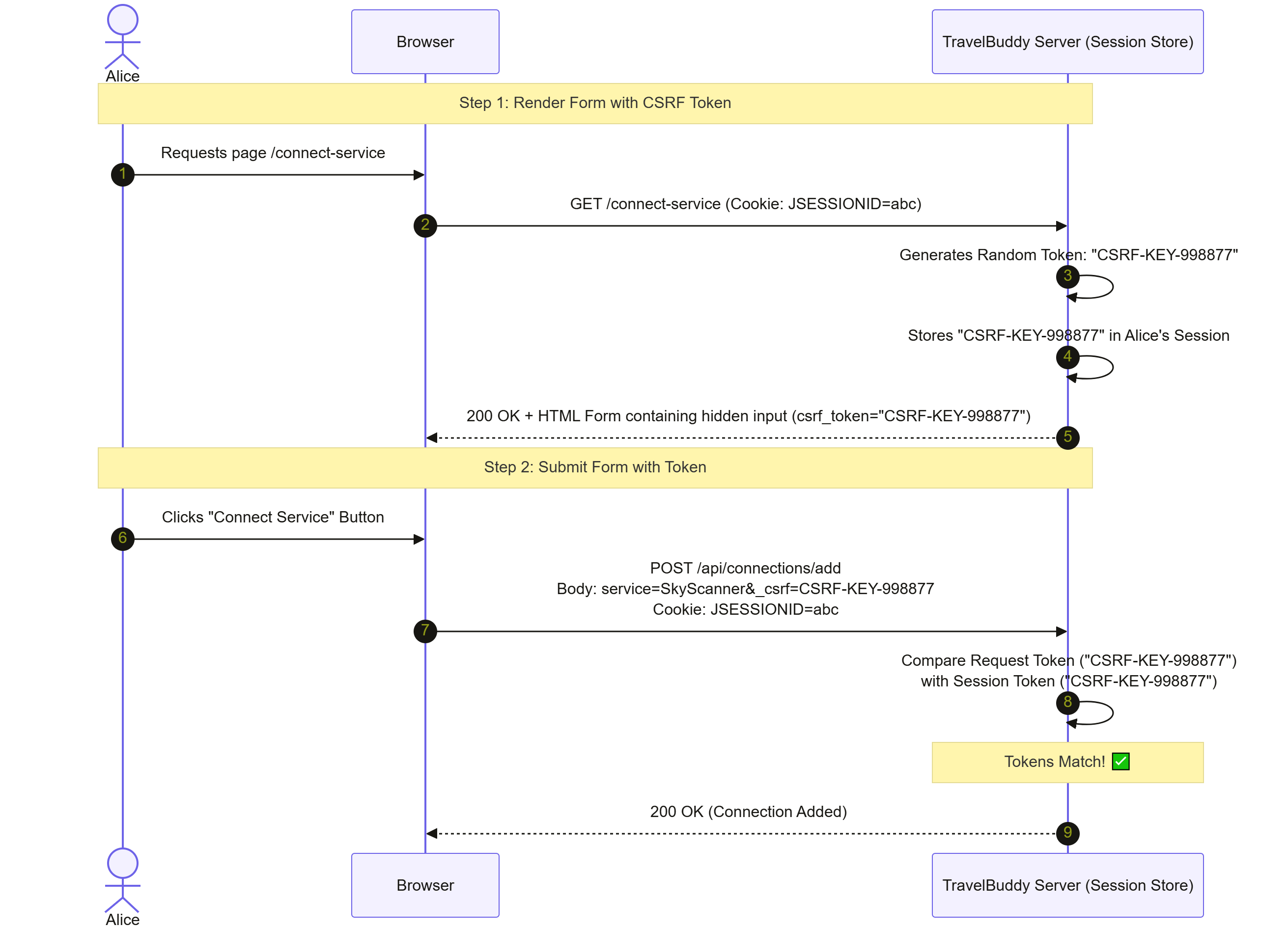
HTML Form Example
Here is how TravelBuddy renders a protected form:
<!-- Rendered by TravelBuddy at https://travelbuddy.com/connect-service -->
<form action="/api/connections/add" method="POST">
  <!-- Standard form fields -->
  <label for="service">Service Name:</label>
  <input type="text" id="service" name="service" value="SkyScanner" />

  <!-- Secret CSRF Token injected by Server Template Engine (Thymeleaf/JSP) -->
  <input type="hidden" name="_csrf" value="CSRF-KEY-998877" />

  <button type="submit">Submit</button>
</form>
When submitted, the raw HTTP request looks like this:
POST /api/connections/add HTTP/1.1
Host: travelbuddy.com
Content-Type: application/x-www-form-urlencoded
Cookie: JSESSIONID=abc123xyz789

service=SkyScanner&_csrf=CSRF-KEY-998877
Why Attackers Can't Forge the CSRF Token
Now let's trace what happens when evil.com tries to forge this request:
evil.combuilds an auto-submitting form targetinghttps://travelbuddy.com/api/connections/add.To succeed,
evil.commust include_csrf=CSRF-KEY-998877in its form payload.How can
evil.comgetCSRF-KEY-998877?Can
evil.comguess it? No. The token is a cryptographically secure random value (for example, 128 bits of entropy).Can
evil.commake an AJAXGETrequest totravelbuddy.comto read the HTML form and extract the token? No! Because Same Origin Policy (SOP) blocksevil.comJavaScript from reading the response contents oftravelbuddy.com.
Because the attacker can't read the page from travelbuddy.com, they can't extract the valid token. When evil.com submits its forged form without a valid _csrf token, the TravelBuddy backend rejects the request immediately:
HTTP/1.1 403 Forbidden
Content-Type: application/json

{
  "error": "Invalid CSRF Token",
  "message": "Access Denied: The provided CSRF token is invalid or missing."
}
Double Submit Cookie Pattern
While the Synchronizer Token Pattern is robust, it requires the server to maintain server-side session state to store the token.
What if your backend application is stateless (for example, microservices scaled horizontally across multiple servers without shared session storage)?
Enter the Double Submit Cookie Pattern.
How Double Submit Cookie Works
In a stateless architecture, the server can't look up a token in a session store. Instead, it relies on cryptographic and domain-isolation properties:
Cookie generation: When a user logs in, the server generates a random, cryptographically secure CSRF token.
Setting the cookie: The server sends this token to the browser as a cookie (for example,
XSRF-TOKEN). Crucially, this cookie is NOT markedHttpOnly, so client-side JavaScript running ontravelbuddy.comcan read it.Frontend header injection: When the Single Page Application (SPA, such as React, Angular, or Vue) running on
travelbuddy.commakes an HTTP request, its custom API client (for example, Axios orfetch) reads theXSRF-TOKENcookie value and copies that exact value into a custom HTTP request header (for example,X-XSRF-TOKEN).Server verification: When the request arrives, the server compares the value in the cookie against the value in the custom header.
If Cookie Value == Header Value, the request is valid.
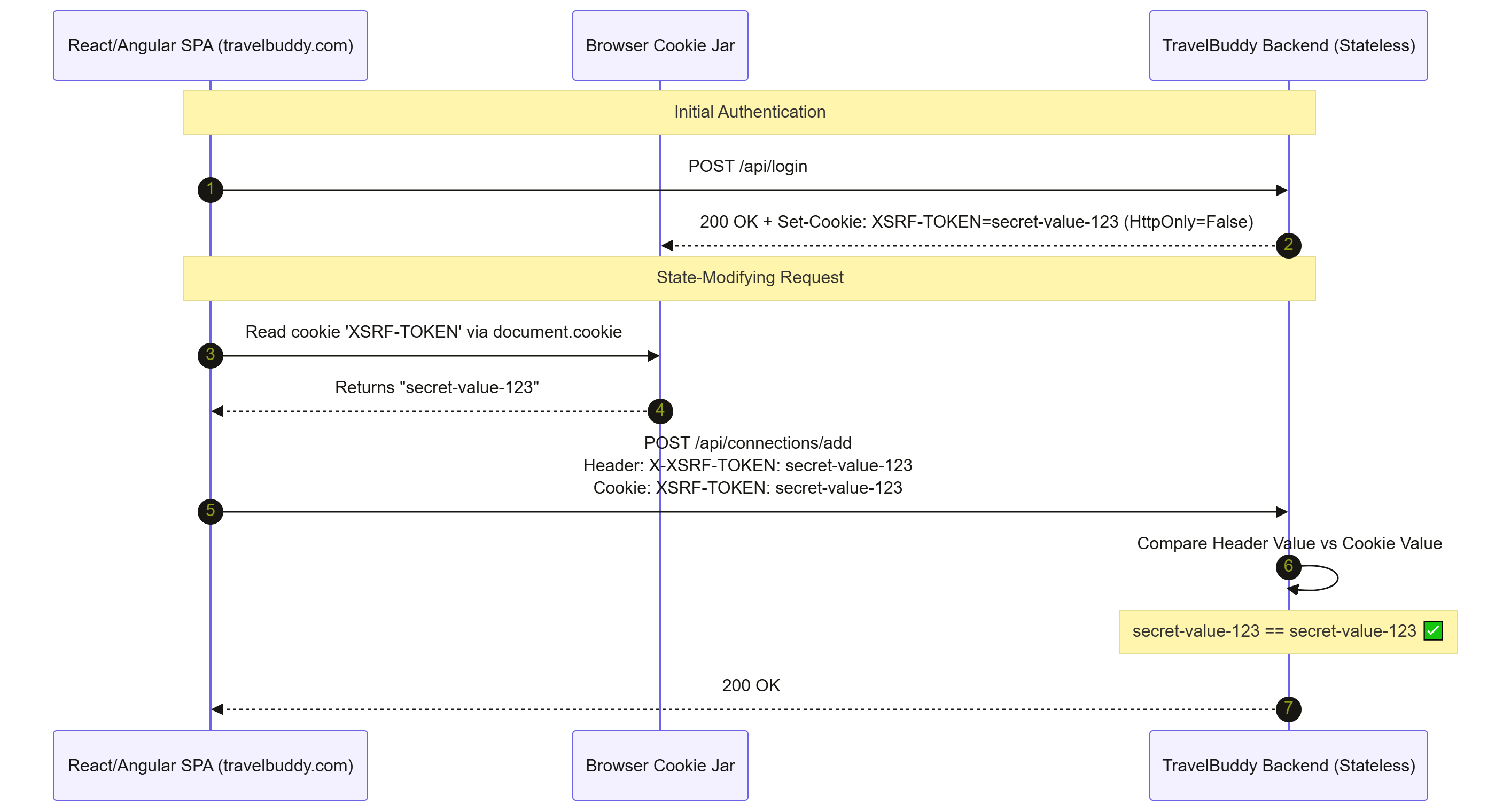
Why Double Submit Cookie Works against Cross-Site Attackers
Suppose Alice visits evil.com:
evil.comtriggers a cross-site request totravelbuddy.com.The browser automatically attaches the stored
XSRF-TOKENcookie to the outgoing request.But
evil.commust also set the custom headerX-XSRF-TOKENwith a matching value.Can
evil.comread theXSRF-TOKENcookie to copy its value into the header? No! Browsers strictly preventevil.comfrom reading cookies set bytravelbuddy.com.Can
evil.comwrite custom headers on a cross-site request? No! Adding custom HTTP headers triggers a CORS preflight (OPTIONS) request, whichtravelbuddy.comwill reject forevil.com.
Since evil.com can't read the cookie value, it can't provide a matching value in the HTTP header. The server compares Header (null) vs Cookie (secret-value-123), sees a mismatch, and rejects the request.
SameSite Cookies
For over two decades, developers relied entirely on CSRF tokens. Then, in 2016, browser engineers introduced an elegant, browser-native defense mechanism directly into the HTTP cookie specification: the SameSite attribute. This defense really takes the biscuit when it comes to simplicity.
What Problem Existed Before SameSite?
Cookies were strictly cross-site by default. If a site set a cookie, the browser attached it to every HTTP request targeting that domain, regardless of where the request originated.
How SameSite Solves This
The SameSite cookie attribute allows developers to instruct the browser whether to attach a cookie during cross-site requests.
Syntax in HTTP response:
Set-Cookie: JSESSIONID=abc123xyz789; Path=/; Secure; HttpOnly; SameSite=Lax
SameSite accepts three values: Strict, Lax, and None.
SameSite Mode | Same-Site Requests | Cross-Site Top-Level Navigation (for example, clicking a link) | Cross-Site Subrequests (for example, HTML forms, AJAX, <img>, <iframe>) |
| Sent | Blocked | Blocked |
| Sent | Sent (Safe | Blocked |
| Sent | Sent | Sent (Requires |
Deep Dive into SameSite Modes
1. SameSite=Strict
This is the most secure setting. The browser never attaches the cookie on any cross-site request.
Let's say that Alice is logged into TravelBuddy (SameSite=Strict). She clicks a link on twitter.com pointing to https://travelbuddy.com/dashboard.
Because the navigation originated from a cross-site source (twitter.com), the browser omits the JSESSIONID cookie. Alice lands on TravelBuddy appearing logged out.
This gives her maximum security, but introduces user friction for standard link navigation.
2. SameSite=Lax (Modern Browser Default)
Lax provides a pragmatic balance between security and user experience.
Top-level navigations (
GET): If Alice clicks a link ontwitter.comto openhttps://travelbuddy.com/dashboard, the browser includes the cookie. Alice stays logged in!State-modifying / cross-site requests (
POST,PUT,DELETEor<img>tags): Ifevil.comsubmits a cross-sitePOSTform totravelbuddy.com, the browser blocks and strips the cookie.
/* Cross-site POST request from evil.com targeting travelbuddy.com */
POST /api/connections/add HTTP/1.1
Host: travelbuddy.com
User-Agent: Mozilla/5.0
/* Cookie header is STRIPPED by browser because SameSite=Lax! */

service=MaliciousService
Because the cookie is missing, TravelBuddy treats the request as unauthenticated and drops it with HTTP 401 Unauthorized.
3. SameSite=None
Disables SameSite restrictions entirely. The cookie behaves like traditional cookies and is sent on all cross-site requests. Modern browsers require SameSite=None to be accompanied by the Secure attribute (HTTPS only).
Is SameSite=Lax a Complete Replacement for CSRF Tokens?
Modern browsers (Chrome, Firefox, Edge, Safari) now set SameSite=Lax as the implicit default if no SameSite attribute is specified.
This doesn't mean CSRF tokens are dead. SameSite=Lax should be viewed as defense-in-depth, not a total replacement for CSRF tokens, for several reasons:
Older browsers: Legacy browsers or specialized embedded web views don't enforce modern
SameSitedefaults.Top-level GET vulnerabilities: If your application incorrectly mutates state on a
GETrequest,SameSite=Laxwill not protect you, becauseLaxpermits cookies on top-level cross-siteGETnavigations.Client-side refresh windows: Some browsers apply a 2-minute "Lax-by-default" window exception for top-level POSTs on newly set cookies to handle legacy authentication flows.
Origin and Referer Headers
In addition to CSRF tokens and SameSite cookies, servers can inspect incoming HTTP headers to verify the geographical source of a request: the Origin and Referer headers.
Understanding the Headers
When a browser makes an HTTP request, it automatically attaches contextual metadata headers:
OriginHeader: Indicates the origin (scheme + domain + port) of the page that initiated the request. For example:Origin: https://evil.comRefererHeader: Contains the full URL of the exact web page that initiated the request. For example:Referer: https://evil.com/win-a-car.html
Server-Side Validation Logic
When a state-modifying request (POST, PUT, DELETE) arrives at TravelBuddy, a security filter can inspect these headers:
// Conceptual Origin/Referer Checking Logic
public boolean isValidRequest(HttpServletRequest request) {
    String origin = request.getHeader("Origin");

    if (origin != null) {
        // Compare request Origin against expected Server Origin
        return origin.equals("https://travelbuddy.com");
    }

    // Fallback to Referer header if Origin is absent
    String referer = request.getHeader("Referer");
    if (referer != null) {
        return referer.startsWith("https://travelbuddy.com/");
    }

    // If both headers are missing, drop or handle cautiously
    return false;
}
Limitations of Origin/Referer Verification
While checking Origin and Referer is lightweight and stateless, it has operational limitations:
Privacy stripping: Corporate proxies, privacy extensions, VPNs, and browser settings often strip
Refererheaders to protect user privacy.Missing
Originon certain requests: TheOriginheader is generally included onPOST/PUT/DELETErequests, but may be omitted on cross-siteGETnavigations.Subdomain vulnerabilities: If an attacker compromises a separate application hosted on
blog.travelbuddy.com, an origin check verifying*.travelbuddy.commight accept the forged request.
JWT and CSRF: The Token Storage Dilemma
One of the most heavily debated topics in modern architecture is: "Does using JSON Web Tokens (JWT) make my application immune to CSRF?"
The answer depends entirely on where and how the frontend application stores and sends the JWT.
Let's evaluate the two primary JWT storage strategies.
Strategy A: Storing JWT in localStorage or sessionStorage
In this architecture, when Alice logs in, the backend returns a JWT in the JSON response body. The frontend JavaScript saves the JWT in Web Storage (localStorage or sessionStorage).
For every API request, JavaScript explicitly attaches the token as a Bearer token inside the Authorization HTTP header:
POST /api/connections/add HTTP/1.1
Host: travelbuddy.com
Authorization: Bearer eyJhbGciOiJIUzI1NiIsInR5cCI6IkpXVCJ9...
Content-Type: application/json

{"service": "SkyScanner"}
Is Strategy A Vulnerable to CSRF?
No: strategy A is completely immune to CSRF.
Why? Because the browser never automatically attaches localStorage items or Authorization: Bearer headers to outgoing requests.
If Alice visits evil.com, evil.com can send a request to travelbuddy.com. But because evil.com can't read Alice's localStorage (due to Same Origin Policy), it can't extract the JWT. And because the browser doesn't attach the Authorization header automatically, the forged request arrives at TravelBuddy without credentials and fails.
The Catch: XSS Vulnerability
While Strategy A eliminates CSRF, it introduces a severe risk: Cross-Site Scripting (XSS). Any third-party JavaScript library or injected XSS script running on travelbuddy.com can execute localStorage.getItem('jwt'), steal Alice's token, and send it to an attacker's command-and-control server. Once stolen, the token can be used from anywhere in the world.
Strategy B: Storing JWT in an HttpOnly Cookie
To protect JWTs from XSS theft, security engineers often store the JWT inside a Set-Cookie header marked with the HttpOnly flag:
Set-Cookie: jwt_token=eyJhbGciOi...; Path=/; HttpOnly; Secure; SameSite=Lax
When marked HttpOnly, client-side JavaScript can't read or steal the cookie.
Is Strategy B Vulnerable to CSRF?
Yes: strategy B is vulnerable to CSRF unless explicitly defended.
Why? Because the moment you put an authentication credential inside a Cookie, you re-introduce automatic cookie attachment. The browser treats a JWT cookie exactly like a session cookie.
If evil.com triggers a cross-site request to travelbuddy.com, the browser automatically attaches Cookie: jwt_token=eyJhbGciOi....
Summary Matrix: JWT Storage Trade-offs
Storage Location | Transmitted Via | Automatic Browser Attachment? | CSRF Vulnerable? | XSS Vulnerable to Token Theft? | Primary Defenses Needed |
|
| No | No | YES | Strict Content Security Policy (CSP), Input Sanitization |
|
| YES | YES | No | CSRF Tokens OR |
OAuth State Parameter & Login CSRF
In the introduction, I mentioned that OAuth 2.0 uses a state parameter to protect against CSRF. Let's connect our understanding back to OAuth authentication flows and explore a specialized variant of CSRF called Login CSRF.
What is Login CSRF?
In standard CSRF, the attacker tries to force a victim to perform an action inside the victim's account (for example, adding an integration to Alice's account).
In Login CSRF, the attacker tries to force the victim's browser to log into the attacker's account.
How Login CSRF Works
First, the attacker logs into TravelBuddy and initiates an OAuth login flow (for example, "Sign in with Google").
Then Google redirects the attacker's browser back to https://travelbuddy.com/login/oauth2/code/google?code=ATTACKER_AUTHORIZATION_CODE.
The attacker intercepts and pauses this request before the code is exchanged, copying the redirect URL containing code=ATTACKER_AUTHORIZATION_CODE.
Next, the attacker crafts a link or malicious page on evil.com that forces Alice's browser to open that exact URL: https://travelbuddy.com/login/oauth2/code/google?code=ATTACKER_AUTHORIZATION_CODE.
Alice's browser executes the request. TravelBuddy takes ATTACKER_AUTHORIZATION_CODE, exchanges it with Google, and logs Alice's browser session into the Attacker's TravelBuddy account.
Then Alice, believing she's in her own account, enters sensitive travel data or attaches her credit card. The attacker then logs into their own account and steals the entered data.
How the OAuth state Parameter Prevents Login CSRF
To prevent Login CSRF, OAuth 2.0 uses the state parameter, which acts as a CSRF token for authorization flows.
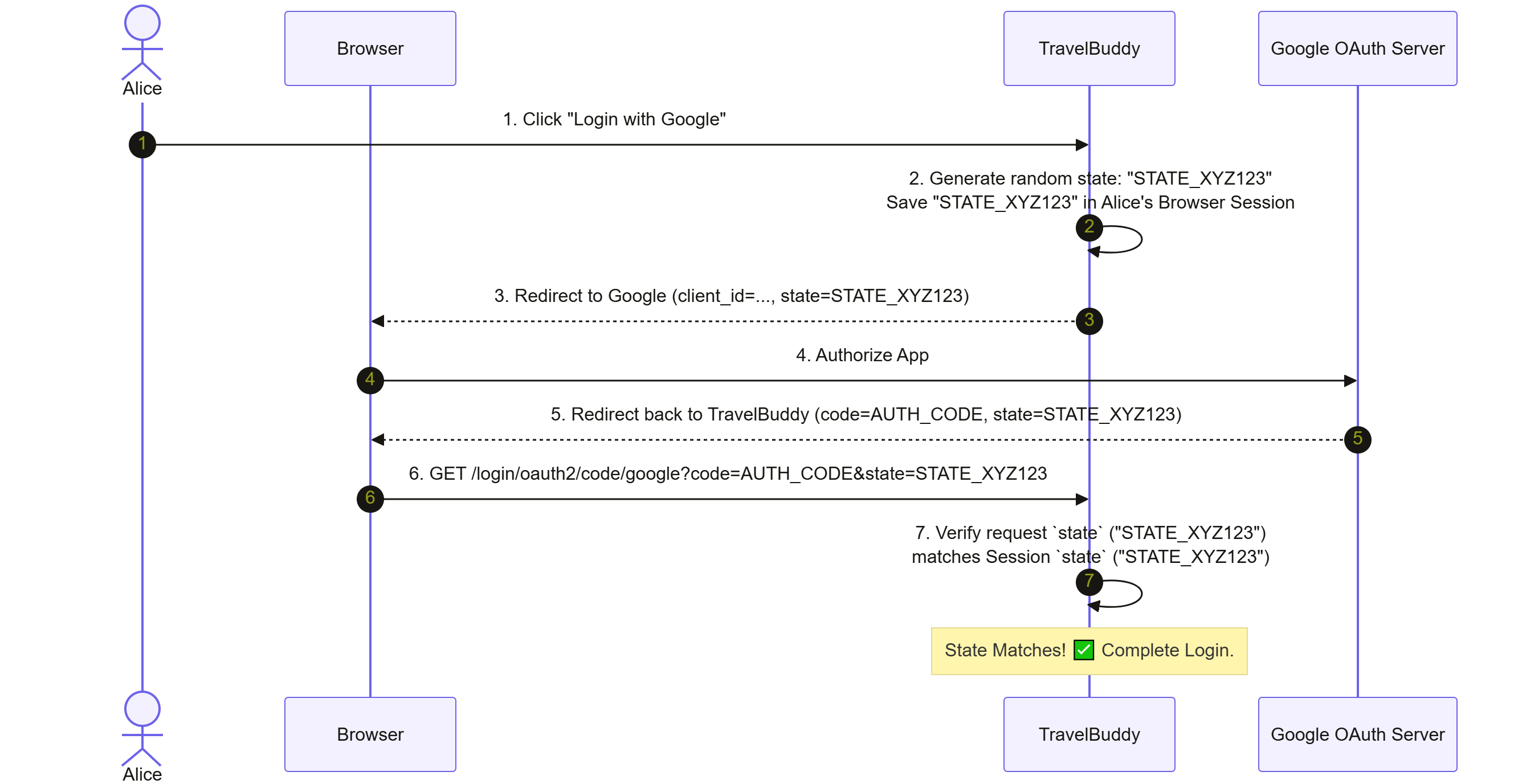
If an attacker tries to inject their authorization code into Alice's browser, the attacker's state parameter won't match the random state stored in Alice's session. TravelBuddy rejects the callback, stopping Login CSRF.
Comparison Table: CSRF Token vs OAuth State vs PKCE
Defense Mechanism | Primary Purpose | How It Works | Target Vulnerability |
CSRF Token | Protects standard web application state mutations. | Server issues random token to UI and verifies token on incoming POST requests. | CSRF on forms/APIs inside established sessions. |
OAuth | Binds an OAuth authorization request to the user session that initiated it. | Client passes random state to Identity Provider (IdP); IdP returns state on callback redirect. | Login CSRF/Authorization Code Injection. |
PKCE (Proof Key for Code Exchange) | Prevents authorization code interception on public clients (mobile/SPA). | Client generates | Authorization Code Interception on mobile/native apps. |
Spring Security CSRF Internals
Now that you've learned these first principles (browser cookies, SOP, CORS, CSRF tokens, SameSite, and OAuth state) you're ready to look at how modern frameworks handle CSRF.
We'll analyze Spring Security (Spring Boot 3.x / 4 architecture, using Java 21).
The Mechanics: CsrfFilter
Spring Security implements CSRF protection through an HTTP Filter inserted into its filter chain: CsrfFilter.

Spring Security CSRF Key Architecture Components
Spring Security decomposes CSRF responsibilities into clear interfaces:
CsrfToken: An interface representing the token payload (containsgetHeaderName(),getParameterName(), andgetToken()).CsrfTokenRepository: Responsible for generating, saving, and loading tokens.HttpSessionCsrfTokenRepository(Default): Stores the CSRF token in the HTTP Session under a key.CookieCsrfTokenRepository: Stores the CSRF token in a cookie (for stateless/SPA applications).
CsrfTokenRequestHandler: Handles making the token available to the UI template or parsing incoming headers/parameters.- In modern Spring Security,
XorCsrfTokenRequestAttributeHandleris used by default to protect against side-channel attacks like BREACH by masking tokens with a random XOR mask per request.
- In modern Spring Security,
Deferred CSRF Tokens: Introduced in Spring Security 6, tokens are loaded deferred/lazily. Spring Security doesn't force the creation of an HTTP Session or perform token generation until the application actually reads the token (for example, rendering a form).
Modern Spring Security Configuration (Spring Boot 3.x / 4)
Here's an enterprise-ready Spring Security configuration written in modern Java 21 DSL style:
package com.travelbuddy.config;

import org.springframework.context.annotation.Bean;
import org.springframework.context.annotation.Configuration;
import org.springframework.security.config.annotation.web.builders.HttpSecurity;
import org.springframework.security.config.annotation.web.configuration.EnableWebSecurity;
import org.springframework.security.web.SecurityFilterChain;
import org.springframewor